User Tools

Site Tools


Translations of this page:

en:bpi-r4:start

BananaPi R4

Hardware

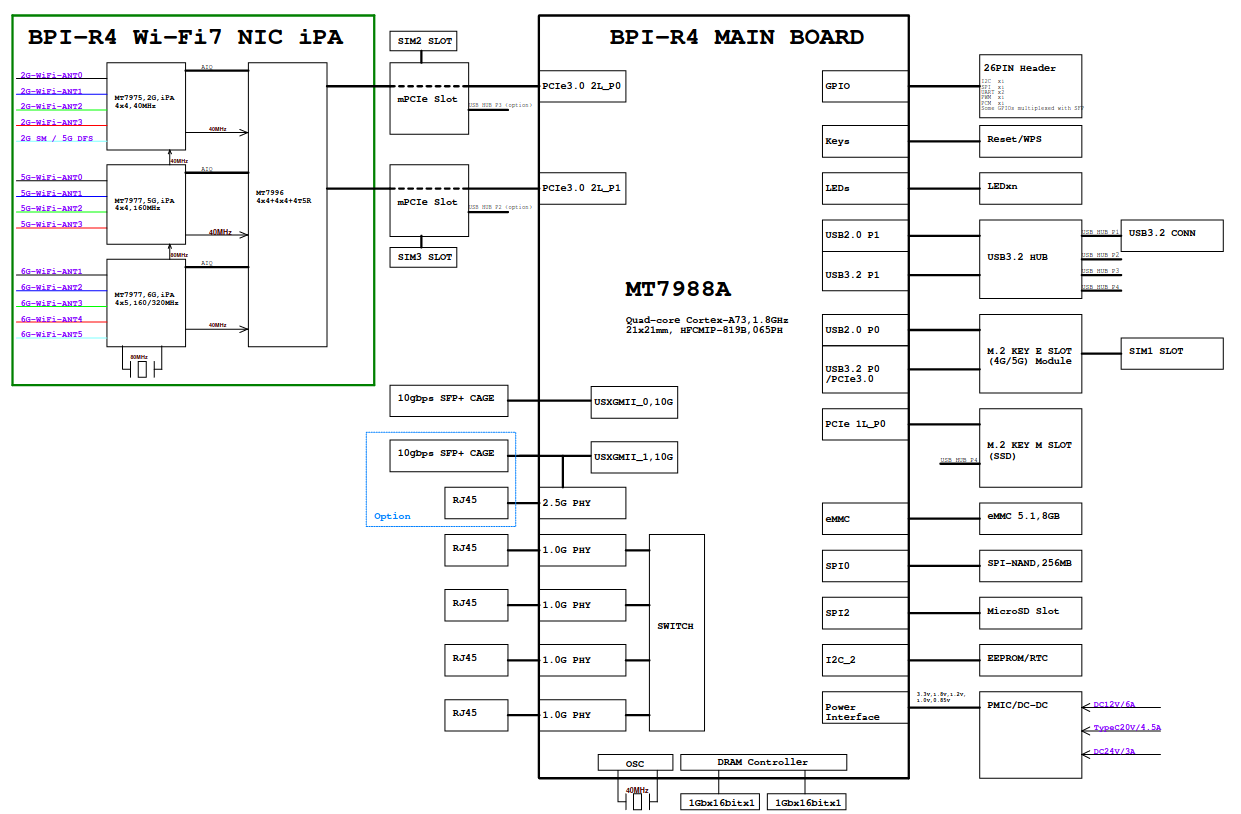
  • MediaTek MT7988A (Filogic 880)
    • MT7530 switch builtin (1 cpu-port with 4GBit/s + 1Gbit/s user-ports)
  • 4G RAM
  • 8GB eMMC flash
  • 128MB SPI-NAND Flash
  • either 2x SFP+ (10GBit/s USXGMII) or 1SFP+ and 2g5 rj45 with PoE (link)
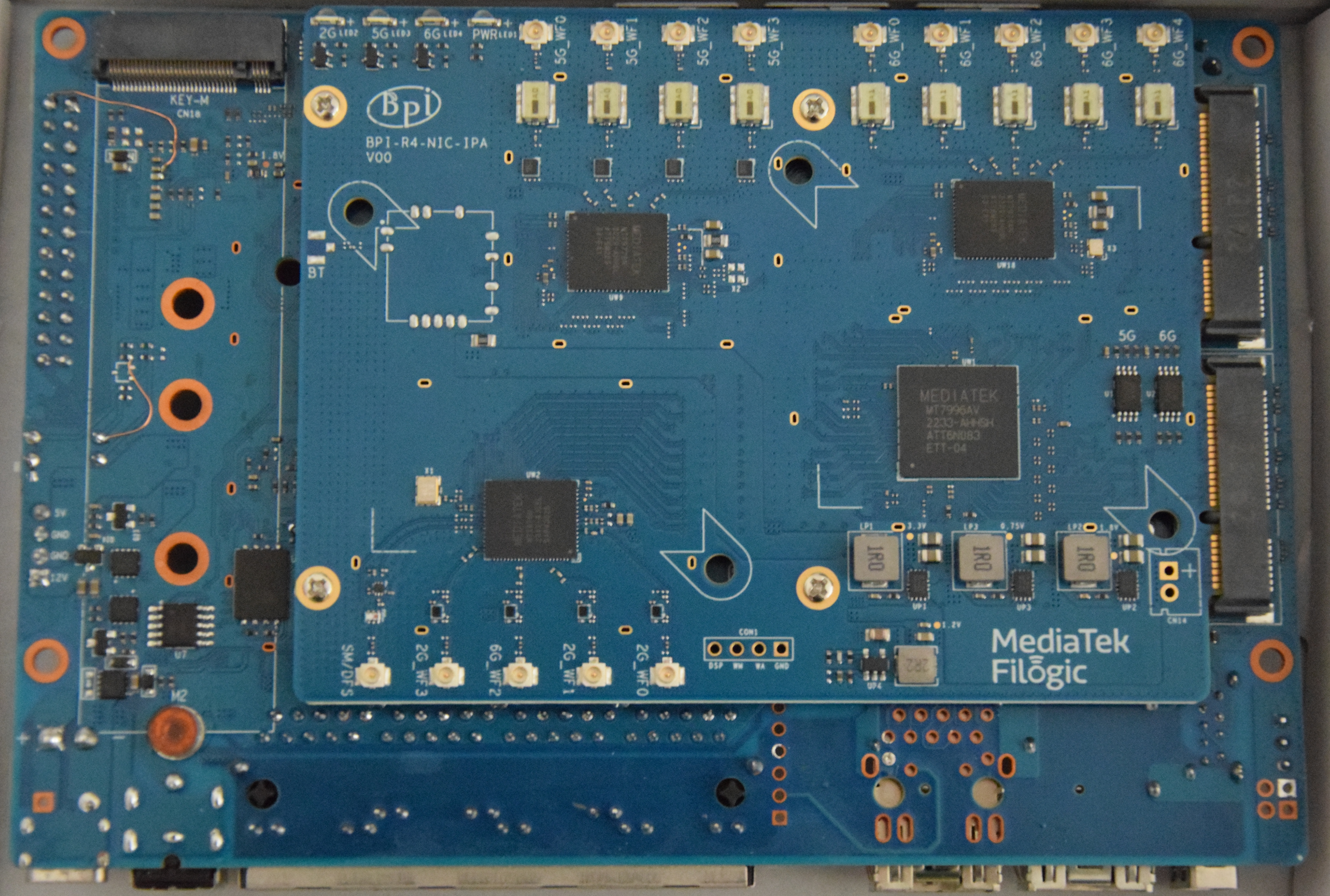
  • Wifi7 with additional module connected to the 2 PCIe slots at bottom of board
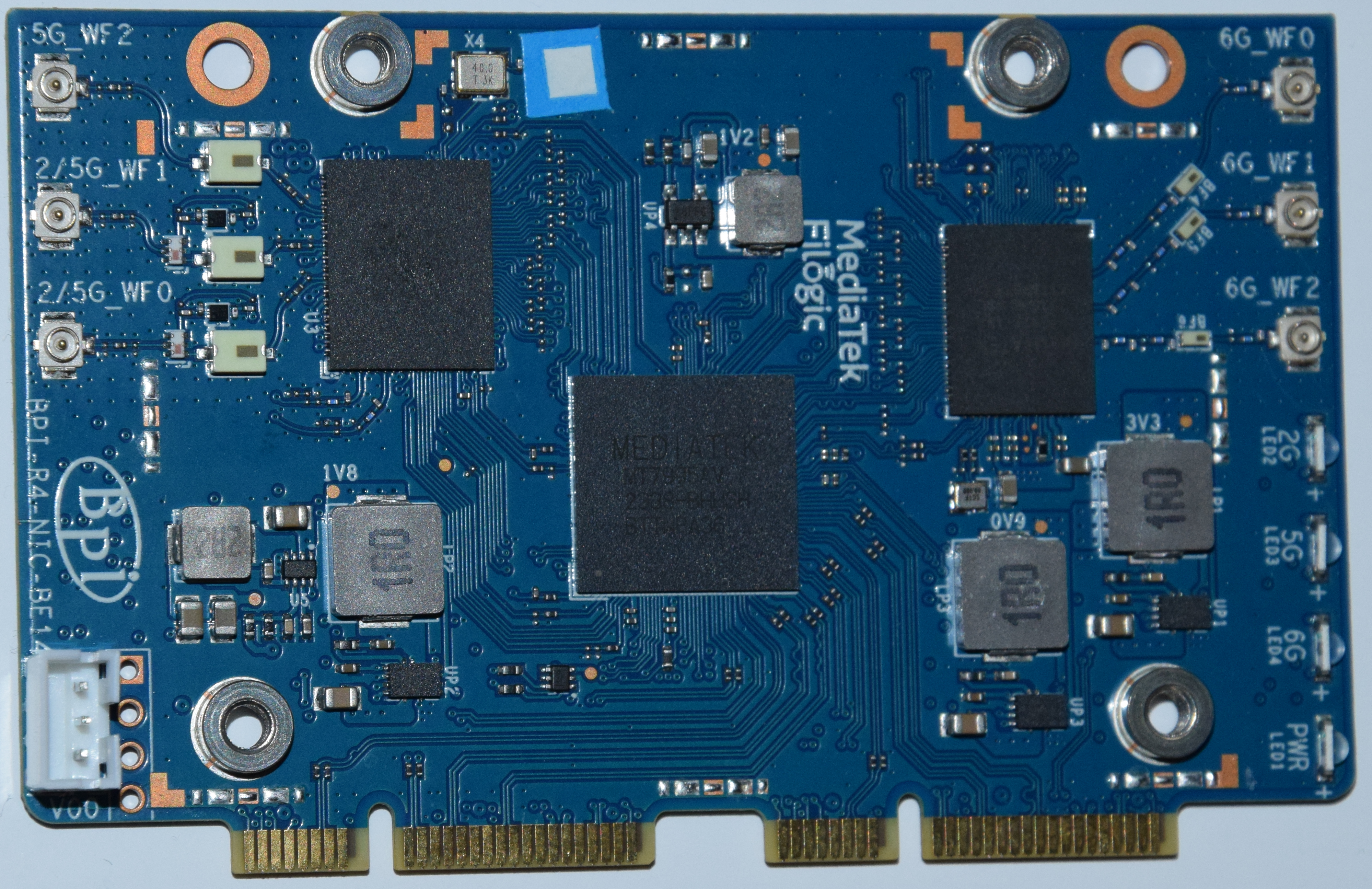
    • BPI-R4-NIC-BE19 (no public sale): MT7996 + MT7975 (2.4G) + MT7977A (6G) + MT7977B (5G)
    • BPI-R4-NIC-BE14: MT7995AV + MT7976CN + MT7977IAN
  • powersupply 12V/5A required when using wifi card,2A (like on other BPi Routers) is not enough
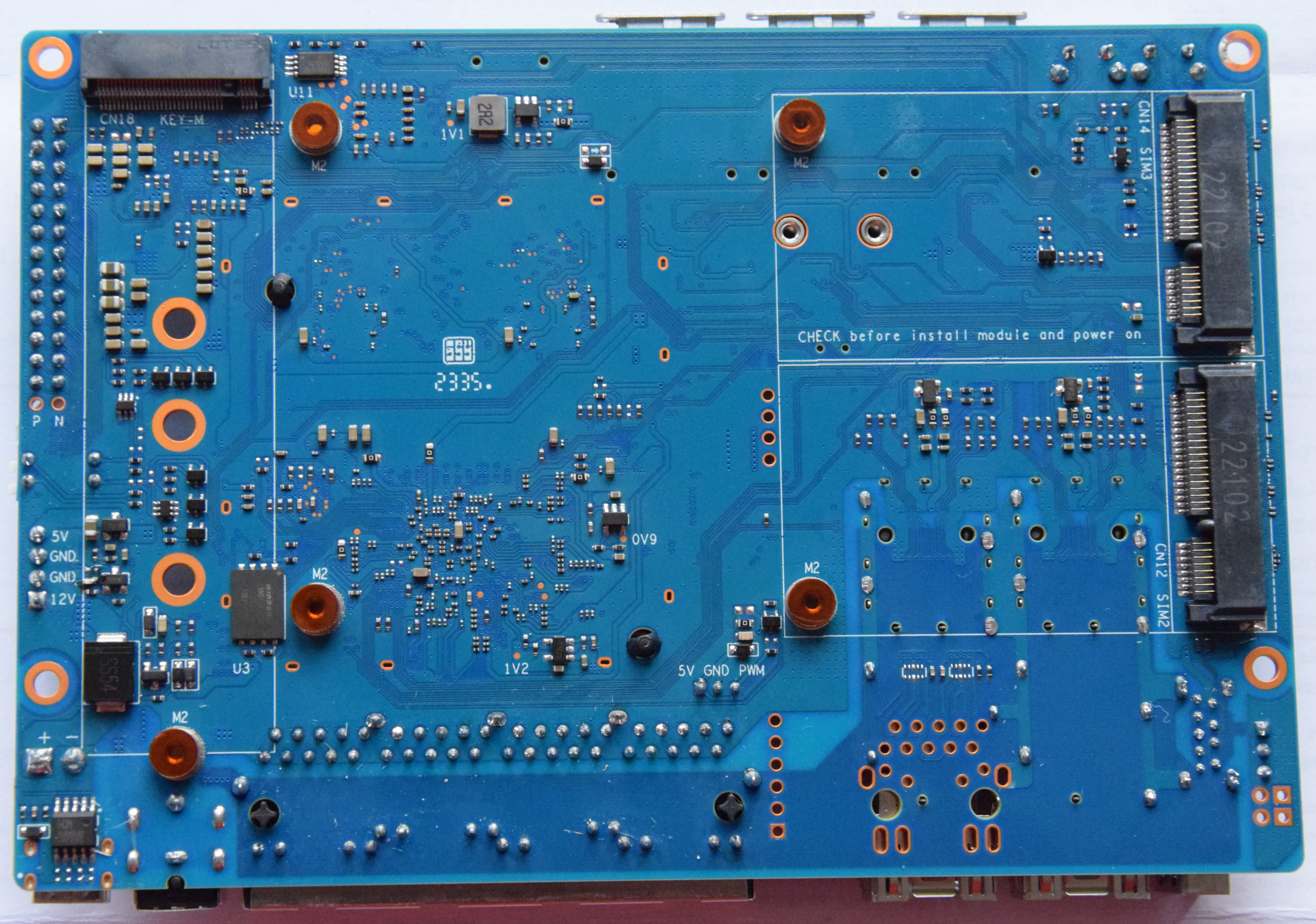
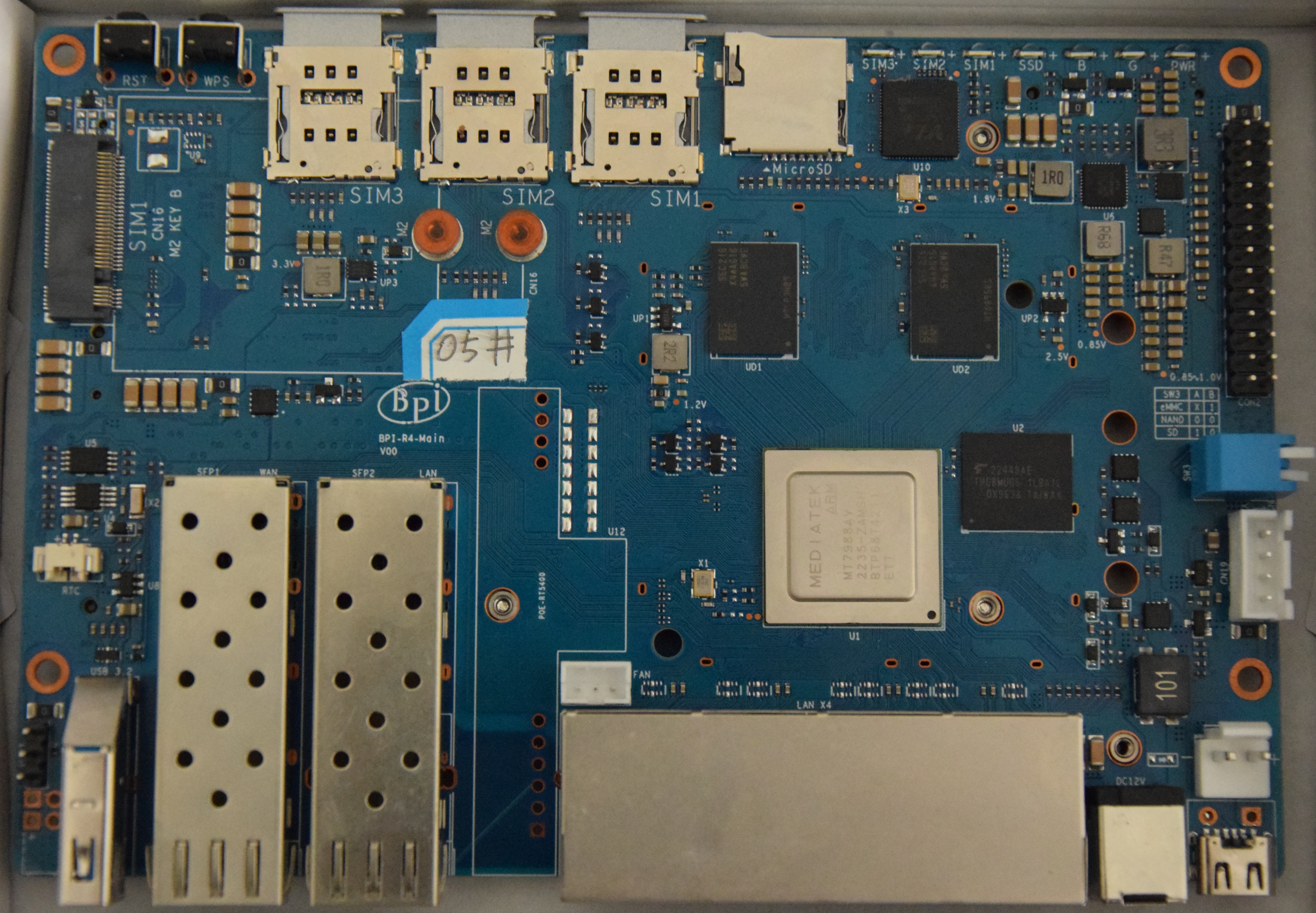
v00:
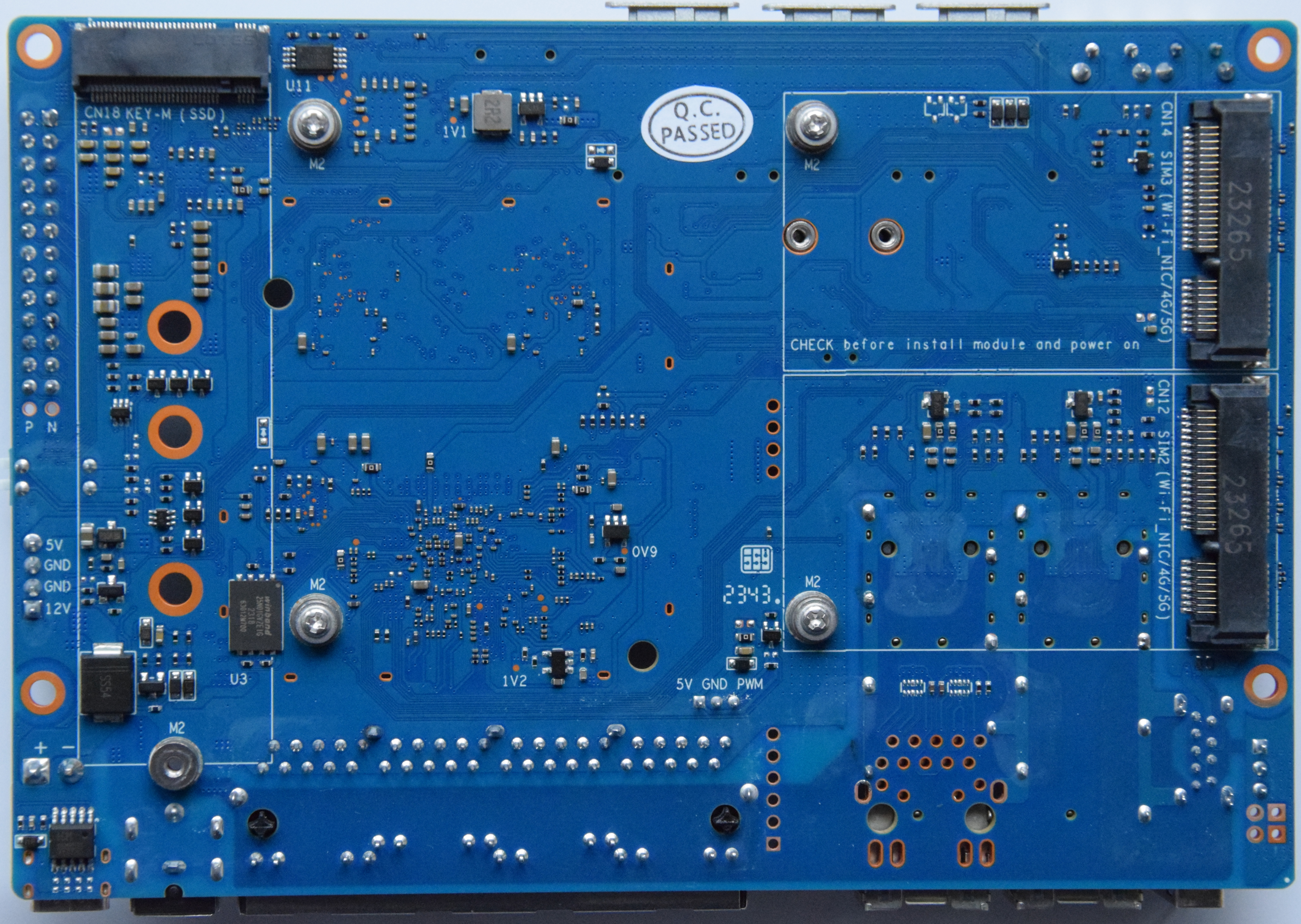
v1.0:
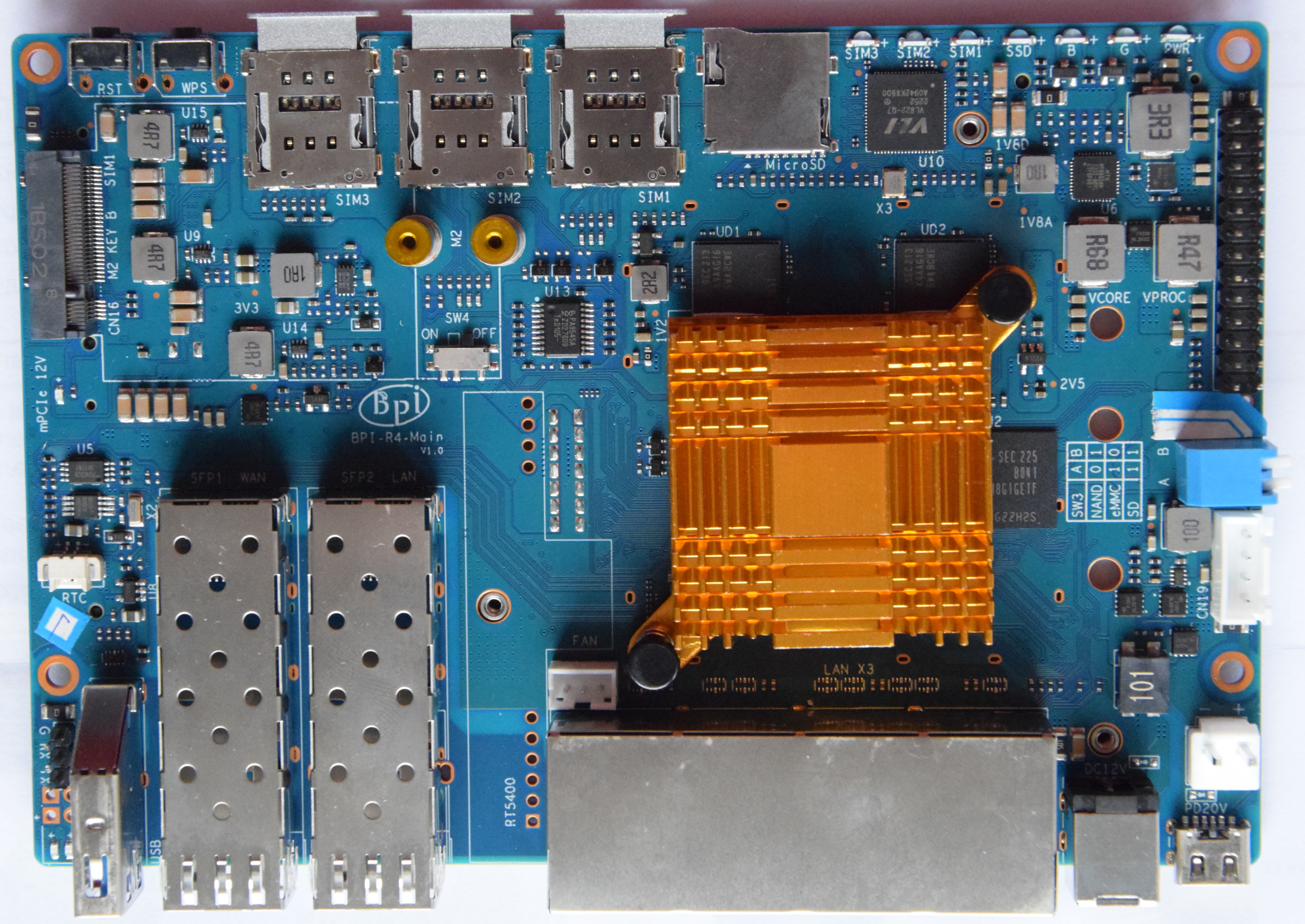
Changes between v0 and v1 (pm): https://forum.banana-pi.org/t/bpi-r4-linux-bootup/15926/59

v1.1:
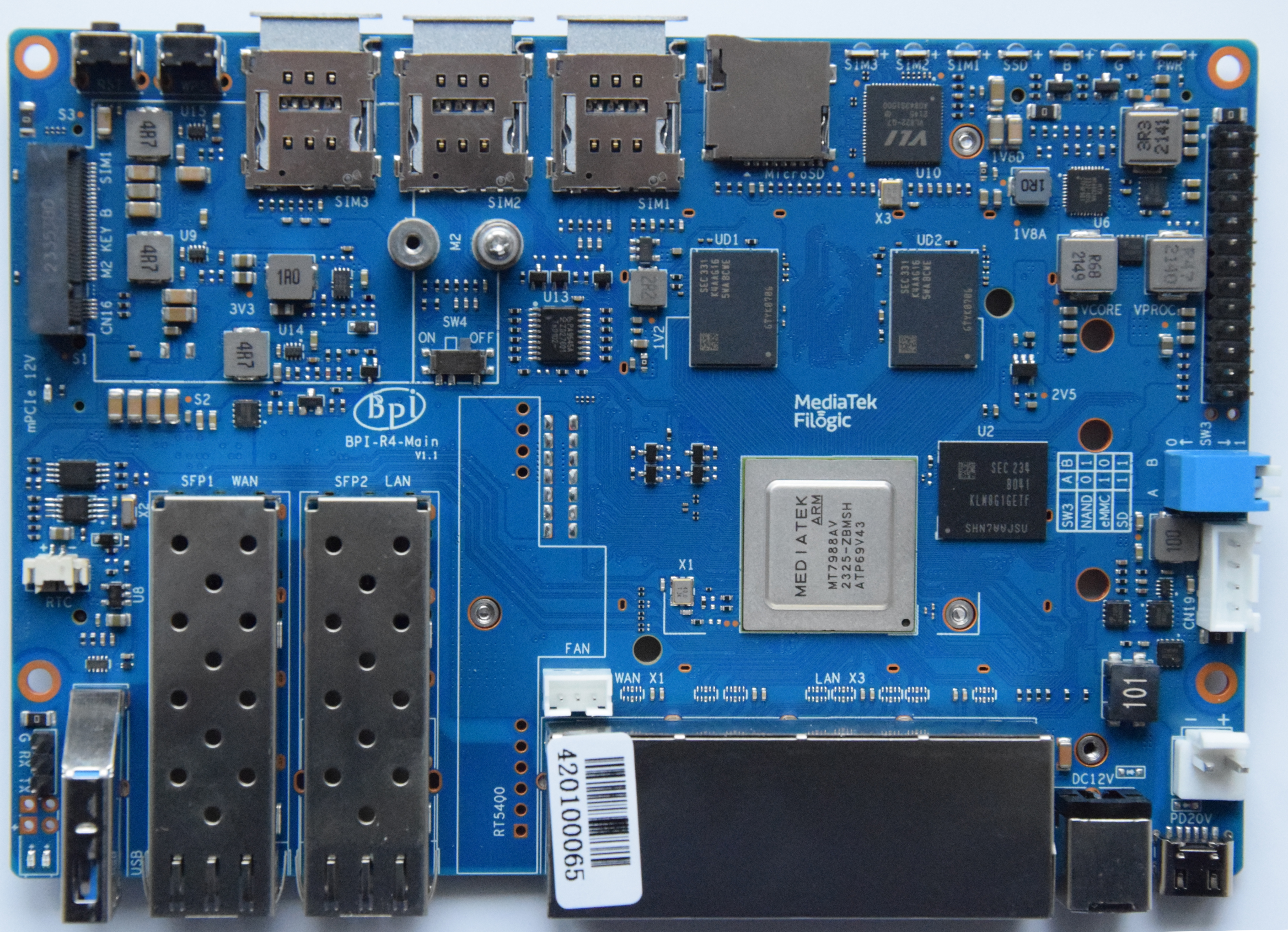
thermal

cat /sys/class/thermal/thermal_zone0/temp

Uses lvts driver

Thermalpad size: https://forum.banana-pi.org/t/banana-pi-bpi-r4-heatsink-and-case-design/16638/53

testing fan

by default first trip point is set to 40°C and second is 85°C…for testing the fan it is a bit high when using a passive heatsink. so just set first to 35 and second to 45.

root@bpi-r4-v11:/sys/class/thermal/thermal_zone0
# cat trip_point_4_temp
40000
root@bpi-r4-v11:/sys/class/thermal/thermal_zone0
# cat trip_point_3_temp
85000
root@bpi-r4-v11:/sys/class/thermal/thermal_zone0
# echo 45000 > trip_point_3_temp
root@bpi-r4-v11:/sys/class/thermal/thermal_zone0
# echo 35000 > trip_point_4_temp
root@bpi-r4-v11:/sys/class/thermal/thermal_zone0

Network

GMAC0 (4GBit/s) is connected internally to mt7530 switch variant where the 4 user-Ports are exposed as rj45 on board (1xWan,3xLan).

The SFP(+) cages are connected to SerDes lanes of GMAC1 and GMAC2, and those can be switched between SGMII/1000Base-X/2500Base-X mode for 10M/100M/1000M/2500M (via mtk-pcs-lynxi, just like on MT7622 and MT7986) and USXGMII/10GBase-KR for 5000M and 10000M.

Supported interface modes for the SFP+ cages of the R4 are: SGMII, 1000Base-X, 2500Base-X, 5GBase-R, 10GBase-R, USXGMII

So 1.25Gbps (= 1000Base-X or SGMII) and 3.125Gbps (= 2500Base-X) SFP modules can work fine with the R4.

Sfp-connections

USB-A SFP1-WAN SFP2-LAN 4xRJ-45 12V USB-C
USXGMII0 USXGMII1 GSW
eth2 eth1 eth0

Click to display ⇲

Click to hide ⇱

pm: https://forum.banana-pi.org/t/bpi-r4-linux-bootup/15926/101 (changed interface-names because eth2 is wan-sfp)

Forward 10g should work with ppe patch,but input needs rss+lro.

https://forum.banana-pi.org/t/bpi-r4-not-getting-full-10gbps-speed-on-wan/18134/30

full 10G will need RSS+LRO implemented in mtk ethernet driver and enabled (not yet working):

ethtool -K eth2 lro on # enable hw_lro
ethtool -k eth2 | grep large
large-receive-offload: on
iperf3 -bidir -c 192.168.90.10

RSS: https://git01.mediatek.com/plugins/gitiles/openwrt/feeds/mtk-openwrt-feeds/+/18f46a84d87308a4f56f9176ca166dc75c38bb20%5E%21/ LRO: https://git01.mediatek.com/plugins/gitiles/openwrt/feeds/mtk-openwrt-feeds/+/ddc366751fad05dade79b09932a999c5d5ae890c%5E%21/#F0

NETSYS: V2 for mt7986 (bpi-r3) V3 for mt7988 (bpi-r4)

Daniel tells me that lro should be enabled via userspace with

ethtool -N $ifname flow-type tcp4 dst-ip $lan_ip loc 0

SFP

bridge-issue

Wifi

wifi is realized with daughter board (Network Interface Card) in the 2 mPCIe-Slots at bottom of the board.

Wifi-Module needs 12V…v1 uses sw4 in on-position, v0 used devicetree-overlay which enables the WIFI_PWR_EN regulator. Be careful with this setting when using different card in mPCIe slots!

kernel-module: mt7996e.ko
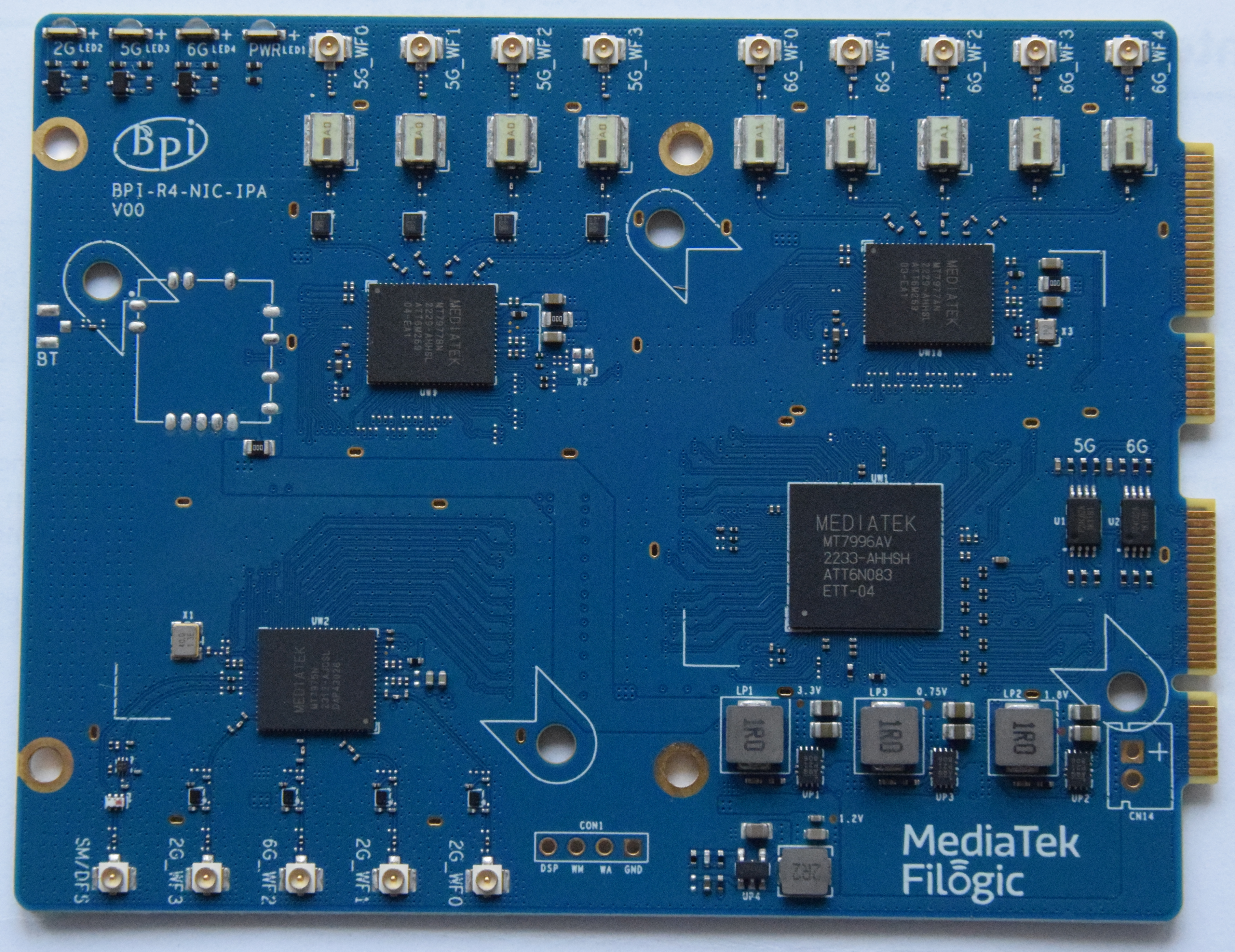
Newer wifi card with reduced antenna-count (6 instead of 14):

https://forum.banana-pi.org/t/banana-pi-bpi-r4-bpi-be14-wi-fi7-nic-module/17182

newer card currently has timeout on 3rd wifi interface (6.8-netnext), i guess we need another firmware file for the mt7977ia frontend

wifi config (inprogress untested):

Click to display ⇲

Click to hide ⇱

5GHz

driver=nl80211
logger_syslog=127
logger_syslog_level=2
logger_stdout=127
logger_stdout_level=2
country_code=PT
ieee80211d=1
ieee80211h=1
hw_mode=a
beacon_int=100
channel=acs_survey


tx_queue_data2_burst=2.0

#num_global_macaddr=1
ieee80211n=1
ht_coex=0
ht_capab=[HT40+][LDPC][SHORT-GI-20][SHORT-GI-40][TX-STBC][RX-STBC1][MAX-AMSDU-7935]
ieee80211ac=1
vht_oper_chwidth=2
vht_oper_centr_freq_seg0_idx=acs_survey
vht_capab=[RXLDPC][SHORT-GI-80][SHORT-GI-160][TX-STBC-2BY1][SU-BEAMFORMER][SU-BEAMFORMEE][MU-BEAMFORMER][MU-BEAMFORMEE][RX-ANTENNA-PATTERN][TX-ANTENNA-PATTERN][RX-STBC-1][SOUNDING-DIMENSION-3][BF-ANTENNA-3][VHT160][MAX-MPDU-11454][MAX-A-MPDU-LEN-EXP7]
ieee80211ax=1
he_oper_chwidth=2
he_oper_centr_freq_seg0_idx=acs_survey
he_su_beamformer=1
he_su_beamformee=1
he_mu_beamformer=1
he_bss_color=128
he_spr_sr_control=3
he_default_pe_duration=4
he_rts_threshold=1023
he_mu_edca_qos_info_param_count=0
he_mu_edca_qos_info_q_ack=0
he_mu_edca_qos_info_queue_request=0
he_mu_edca_qos_info_txop_request=0
he_mu_edca_ac_be_aifsn=8
he_mu_edca_ac_be_aci=0
he_mu_edca_ac_be_ecwmin=9
he_mu_edca_ac_be_ecwmax=10
he_mu_edca_ac_be_timer=255
he_mu_edca_ac_bk_aifsn=15
he_mu_edca_ac_bk_aci=1
he_mu_edca_ac_bk_ecwmin=9
he_mu_edca_ac_bk_ecwmax=10
he_mu_edca_ac_bk_timer=255
he_mu_edca_ac_vi_ecwmin=5
he_mu_edca_ac_vi_ecwmax=7
he_mu_edca_ac_vi_aifsn=5
he_mu_edca_ac_vi_aci=2
he_mu_edca_ac_vi_timer=255
he_mu_edca_ac_vo_aifsn=5
he_mu_edca_ac_vo_aci=3
he_mu_edca_ac_vo_ecwmin=5
he_mu_edca_ac_vo_ecwmax=7
he_mu_edca_ac_vo_timer=255

interface=phy2-ap0
ctrl_interface=/var/run/hostapd
ap_isolate=1
bss_load_update_period=60
chan_util_avg_period=600
disassoc_low_ack=1
skip_inactivity_poll=0
preamble=1
wmm_enabled=1
ignore_broadcast_ssid=0
uapsd_advertisement_enabled=1
utf8_ssid=1
multi_ap=0
sae_require_mfp=1
sae_pwe=2
wpa_passphrase=testtesttest
wpa_psk_file=/var/run/hostapd-phy2-ap0.psk
auth_algs=1
wpa=2
wpa_pairwise=CCMP
ssid=MT7996-233-test-5
bridge=br-lan
wds_bridge=
snoop_iface=br-lan
wpa_disable_eapol_key_retries=0
wpa_key_mgmt=SAE
okc=1
ieee80211w=2
group_mgmt_cipher=AES-128-CMAC
dynamic_vlan=0
vlan_naming=1
vlan_no_bridge=1
vlan_file=/var/run/hostapd-phy2-ap0.vlan
qos_map_set=0,0,2,16,1,1,255,255,18,22,24,38,40,40,44,46,48,56
bssid=fe:9c:48:0a:86:32
#default_macaddr

2.4ghz:

driver=nl80211
logger_syslog=127
logger_syslog_level=2
logger_stdout=127
logger_stdout_level=2
country_code=PT
ieee80211d=1
hw_mode=g
supported_rates=60 90 120 180 240 360 480 540
basic_rates=60 120 240
beacon_int=100
channel=acs_survey

#num_global_macaddr=1
ieee80211n=1
ht_coex=0
ht_capab=[LDPC][SHORT-GI-20][SHORT-GI-40][TX-STBC][RX-STBC1][MAX-AMSDU-7935]
ieee80211ax=1
he_su_beamformer=1
he_su_beamformee=1
he_mu_beamformer=1
he_bss_color=128
he_spr_sr_control=3
he_default_pe_duration=4
he_rts_threshold=1023
he_mu_edca_qos_info_param_count=0
he_mu_edca_qos_info_q_ack=0
he_mu_edca_qos_info_queue_request=0
he_mu_edca_qos_info_txop_request=0
he_mu_edca_ac_be_aifsn=8
he_mu_edca_ac_be_aci=0
he_mu_edca_ac_be_ecwmin=9
he_mu_edca_ac_be_ecwmax=10
he_mu_edca_ac_be_timer=255
he_mu_edca_ac_bk_aifsn=15
he_mu_edca_ac_bk_aci=1
he_mu_edca_ac_bk_ecwmin=9
he_mu_edca_ac_bk_ecwmax=10
he_mu_edca_ac_bk_timer=255
he_mu_edca_ac_vi_ecwmin=5
he_mu_edca_ac_vi_ecwmax=7
he_mu_edca_ac_vi_aifsn=5
he_mu_edca_ac_vi_aci=2
he_mu_edca_ac_vi_timer=255
he_mu_edca_ac_vo_aifsn=5
he_mu_edca_ac_vo_aci=3
he_mu_edca_ac_vo_ecwmin=5
he_mu_edca_ac_vo_ecwmax=7
he_mu_edca_ac_vo_timer=255

interface=phy1-ap0
ctrl_interface=/var/run/hostapd
ap_isolate=1
bss_load_update_period=60
chan_util_avg_period=600
disassoc_low_ack=1
skip_inactivity_poll=0
preamble=1
wmm_enabled=1
ignore_broadcast_ssid=0
uapsd_advertisement_enabled=1
utf8_ssid=1
multi_ap=0
sae_require_mfp=1
sae_pwe=2
wpa_passphrase=testtesttest
wpa_psk_file=/var/run/hostapd-phy1-ap0.psk
auth_algs=1
wpa=2
wpa_pairwise=CCMP
ssid=MT7996-233-test-2.4
bridge=br-lan
wds_bridge=
snoop_iface=br-lan
wpa_disable_eapol_key_retries=0
wpa_key_mgmt=SAE
okc=1
ieee80211w=2
group_mgmt_cipher=AES-128-CMAC
dynamic_vlan=0
vlan_naming=1
vlan_no_bridge=1
vlan_file=/var/run/hostapd-phy1-ap0.vlan
qos_map_set=0,0,2,16,1,1,255,255,18,22,24,38,40,40,44,46,48,56
bssid=fe:9c:48:0a:86:31
#default_macaddr

Issues

MLO

Due to MLO there is only 1 phy visible since kernel 6.14

https://forum.banana-pi.org/t/bpi-r4-kernel-6-14-wifi-interfaces-on-be14-not-discovered/22876/9

# iw list | grep -A 2 'interface combination'                                   
        valid interface combinations:                                           
                 * #{ AP } <= 16, #{ managed } <= 19,                           
                   total <= 19, #channels <= 1, STA/AP BI must match, radar det}
# iw dev wlan0 interface add wlan1 type managed
# iw dev wlan0 interface add wlan2 type managed

# iw dev wlan1 info                                                             
Interface wlan1                                                                 
        ifindex 11                                                              
        wdev 0x2                                                                
        addr 00:0c:43:26:60:10                                                  
        type managed                                                            
        wiphy 0                                                                 
        multicast TXQ:                                                          
                qsz-byt qsz-pkt flows   drops   marks   overlmt hashcol tx-bytes
                0       0       0       0       0       0       0       0      0

Then give these 3 interfaces different MAC addresses an run on each a hostapd process.

With systemd it can be done with netdev files in /etc/systemd/network

[NetDev]
Name=wlan1
Kind=wlan

[WLAN]
PhysicalDevice=phy0
Type=ap

extension cable

jumbo frames

needs patches for jumbo frame support

https://github.com/frank-w/BPI-Router-Linux/commits/6.19-jumbo/

  • first mac has to be set to up to calculate max-mtu (ip l set eth0 up)
  • mac has to be restarted with the mtu setting to adjust RX buffers (ip l set eth0 down+ip l set dev eth0 mtu 9000 up)
  • then dsa-port can be brought up with mtu setting (ip link set dev lan3 mtu 9000 up)

PCIE

2x1Lane (M.2 slots) and 2x2lane. the 2x2lane is for wifi (mPCIe slots).

USB

Sim slots

  • CN16(M.2 KEY) – SIM1
  • CN12 (mPCIE) – SIM2
  • CN14 (mPCIE) – SIM3

Bootswitch

A B
nand 0 1
eMMC 1 0
SD 1 1

switch down is “1”, so both down booting from sdcard (v0 had both up to boot from sdcard)

v0:

Click to display ⇲

Click to hide ⇱

  1. both switches up ⇒ sdcard
  2. down (1),up (0) seems to be nand as this have mtd command
  3. up(0),down(1) also boots into bpis bootmenu, but i have no mtd command, so i guess this is the emmc
  4. both down failed

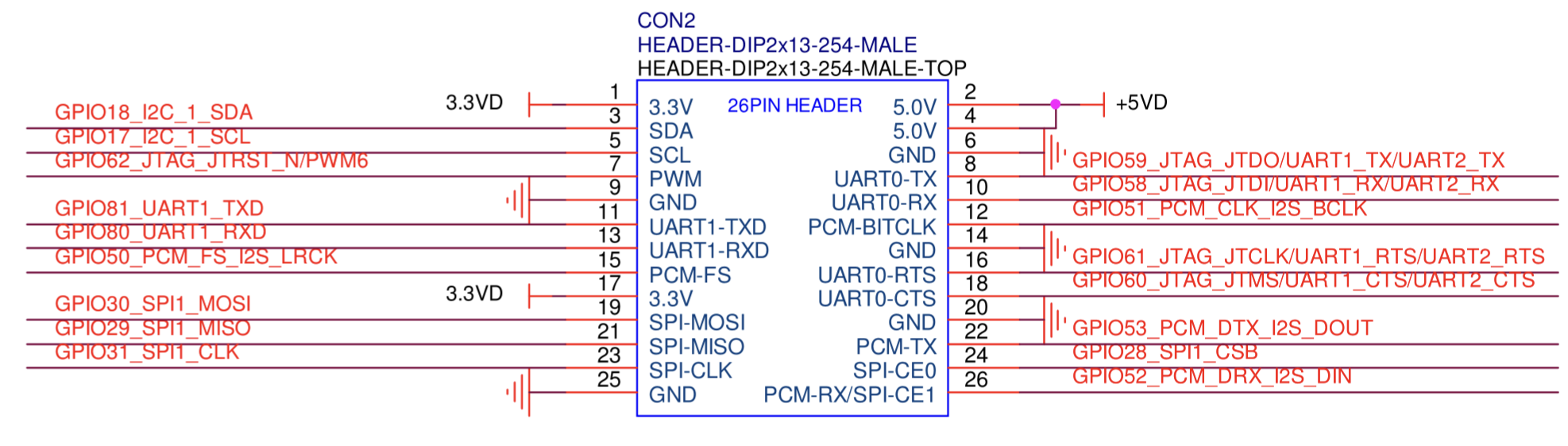
GPIO

PWM

How to get pwm6 working:

https://forum.banana-pi.org/t/bpi-r4-cpu-fan-setup/17362/102

echo "pwm6_0 pwm" > /sys/kernel/debug/pinctrl/1001f000.pinctrl-pinctrl_moore/pinmux-select # Enable PWM function on the pin group pwm6_0 (GPIO62)
echo 100000 > /sys/class/pwm/pwmchip0/period # Set freq to 10 kHz (100000 ns period)
echo 40000 > /sys/class/pwm/pwmchip0/duty_cycle # Set duty cycle to 40% (40000 ns active)
echo 1 > /sys/class/pwm/pwmchip0/enable # Run PWM

eeprom

BPI-R4 has an eeprom on i2c-mux channel 0

[ 1.515672] at24 2-0057: 256 byte 24c02 EEPROM, writable, 1 bytes/write

write-mode (wp-gpio is linked to green led):

# echo 0 > /sys/devices/platform/gpio-leds/leds/green:status/brightness
root@bpi-r4-v11:~
# echo "test" > /sys/bus/i2c/devices/2-0057/eeprom
root@bpi-r4-v11:~
# hexdump -C /sys/bus/i2c/devices/2-0057/eeprom
00000000  74 65 73 74 0a ff ff ff  ff ff ff ff ff ff ff ff  |test............|
00000010  ff ff ff ff ff ff ff ff  ff ff ff ff ff ff ff ff  |................|
*
00000100
root@bpi-r4-v11:~
# echo 1 > /sys/devices/platform/gpio-leds/leds/green:status/brightness
root@bpi-r4-v11:~

https://docs.phytec.com/projects/yocto-phycore-am65x/en/latest/interfaceguides/eeprom.html

U-Boot

BPI-R4> i2c bus
Bus 0:  i2c@11004000
Bus 1:  i2c@11005000
   70: i2c-mux@70, offset len 1, flags 0
Bus 2:  i2c@11005000->i2c-mux@70->i2c@0
   57: eeprom@57, offset len 1, flags 0
BPI-R4> i2c dev 2
Setting bus to 2
BPI-R4> i2c probe
BPI-R4> i2c md 0x57 0 5
0000: 74 65 73 74 0a    test.
BPI-R4> i2c read 0x57 0 5 $loadaddr
BPI-R4> md.b $loadaddr 5
46000000: 74 65 73 74 0a

rtc

Battery connection looks like charging circuit for ml2032. You should not connect non-rechargeable battery like cr2032.

https://forum.banana-pi.org/t/bpi-r3-bpi-r4-does-the-bpi-r3-r4-have-a-rtc/17763/36

Connector is JST with 1.25mm pitch

RTC time will survive software reboot

# dmesg | grep rtc
[    1.479923] rtc-pcf8563 2-0051: low voltage detected, date/time is not reliable.
[    1.487390] rtc-pcf8563 2-0051: registered as rtc0
[    1.493378] rtc-pcf8563 2-0051: low voltage detected, date/time is not reliable.
[    1.500771] rtc-pcf8563 2-0051: hctosys: unable to read the hardware clock
root@bpi-r4-v11:~
# date -s "2024-04-27 09:55 CEST"
Sat Apr 27 07:55:00 UTC 2024
root@bpi-r4-v11:~
# hwclock -w
root@bpi-r4-v11:~
# hwclock -r
2024-04-27 07:56:23.979830+00:00
root@bpi-r4-v11:~
# reboot
...
root@bpi-r4-v11:~
# dmesg | grep rtc
[    1.480067] rtc-pcf8563 2-0051: registered as rtc0
[    1.486061] rtc-pcf8563 2-0051: setting system clock to 2024-04-27T07:56:53 )
root@bpi-r4-v11:~
# date
Sat Apr 27 08:00:46 UTC 2024
root@bpi-r4-v11:~

uboot/ATF

uboot

currently use these:

and bootup "my" kernel like this:

MT7988> setenv fit 6.5.0-rc1-mt7988.itb
MT7988> setenv kaddr 0x48000000
MT7988> fatload mmc 0:5 ${kaddr} ${fit}
4970220 bytes read in 417 ms (11.4 MiB/s)
MT7988> bootm ${kaddr}

kaddr 0x46000000 works too, if uncompressed kernelimage is smaller than 32M (fit size of 14M was too large)

in newer u-boot i have set kaddr to 0x46000000 (fit loadaddr 0x44000000, rdaddr 0x48000000)

ram-boot with mtk_uartboot tool:

fix_bricked_boot

bpi-r4_ram.tar.gz

./mtk_uartboot -s /dev/ttyUSB4 --aarch64 --payload bpi-r4_ram_bl2.bin --fip bpi-r4_ram_fip.bin

Click to display ⇲

Click to hide ⇱

mtk_uartboot - 0.1.1
Using serial port: /dev/ttyUSB4
Handshake...
hw code: 0x7988
hw sub code: 0x8a00
hw ver: 0xcb00
sw ver: 0x1
Baud rate set to 460800
sending payload to 0x201000...
Checksum: 0x32ed
Setting baudrate back to 115200
Jumping to 0x201000 in aarch64...
Waiting for BL2. Message below:
==================================
NOTICE:  BL2: v2.9(release):v2.9.0-358-g4e064f88b83f ram
NOTICE:  BL2: Built : 18:38:51, Jun 11 2024
NOTICE:  WDT: Cold boot
NOTICE:  WDT: disabled
NOTICE:  CPU: MT7988
NOTICE:  EMI: Using DDR unknown settings
NOTICE:  EMI: Detected DRAM size: 4096 MB
NOTICE:  EMI: complex R/W mem test passed
NOTICE:  Starting UART download handshake ...
==================================
BL2 UART DL version: 0x10
Baudrate set to: 921600
FIP sent.
==================================
NOTICE:  Received FIP 0x4440d @ 0x40400000 ...
==================================

chainload

BPI-R4> fatload usb 0:1 $loadaddr u-boot-r4-2025.04-i2c.bin
903816 bytes read in 567 ms (1.5 MiB/s)
BPI-R4> go $loadaddr

8GB RAM

phy-variant

right kernel devicetrees have to be loaded

example for 6.15-rc:

bootconf=#conf-base-2g5#ov-sd
fit=6.15.0-rc1.itb
9625136 bytes read in 645 ms (14.2 MiB/s)
## Loading kernel from FIT Image at 46000000 ...
   Using 'conf-base-2g5' configuration
   ...
   Using 'ov-sd' configuration
   Trying 'fdt-ov-sd' fdt subimage

firmware has to be downloaded and installed to /lib/firmware/mediatek/

https://git.kernel.org/pub/scm/linux/kernel/git/firmware/linux-firmware.git/tree/mediatek/mt7988/i2p5ge-phy-pmb.bin

then module has to be loaded (currently not autoloaded in debian and result in crash if not loaded and interface set to up).

root@bpi-r4-8G:~# modprobe mtk-2p5ge
root@bpi-r4-8G:~# ip link set eth1 up
[   40.141879] MediaTek MT7988 2.5GbE PHY mdio-bus:0f: Firmware date code: 0/0/0, version: 0.0
[   41.492639] MediaTek MT7988 2.5GbE PHY mdio-bus:0f: Firmware loading/trigger ok.
[   41.500970] mtk_soc_eth 15100000.ethernet eth1: PHY [mdio-bus:0f] driver [MediaTek MT7988 2.5GbE PHY] (irq=POLL)
[   41.511319] mtk_soc_eth 15100000.ethernet eth1: configuring for phy/internal link mode
root@bpi-r4-8G:~# [   44.697996] mtk_soc_eth 15100000.ethernet eth1: Link is Up - 1Gbps/Full - flow control rx/tx

root@bpi-r4-8G:~# ip a a 192.168.0.19/24 dev eth1
root@bpi-r4-8G:~# ping 192.168.0.11
PING 192.168.0.11 (192.168.0.11) 56(84) bytes of data.
64 bytes from 192.168.0.11: icmp_seq=1 ttl=64 time=0.339 ms
64 bytes from 192.168.0.11: icmp_seq=2 ttl=64 time=0.169 ms
^C
--- 192.168.0.11 ping statistics ---
2 packets transmitted, 2 received, 0% packet loss, time 1012ms
rtt min/avg/max/mdev = 0.169/0.254/0.339/0.085 ms

maybe put it in /etc/modules

echo "mtk-2p5ge" >> /etc/modules

tftp

BPI-R4> setenv bootfile 6.5.0-rc1-mt7988-r4.itb
BPI-R4> run bootnetfit

openwrt image

using bin/targets/mediatek/filogic/openwrt-mediatek-filogic-bananapi_bpi-r4-initramfs-recovery.itb

BPI-R4> usb start
BPI-R4> ls usb 0:1 r4
            ./
            ../
  7929856   openwrt-mediatek-filogic-bananapi_bpi-r4-initramfs-recovery.itb

1 file(s), 2 dir(s)

BPI-R4> fatload usb 0:1 0x50000000 r4/openwrt-mediatek-filogic-bananapi_bpi-r4-initramfs-recovery.itb
7929856 bytes read in 672 ms (11.3 MiB/s)
BPI-R4> bootm 0x50000000#config-mt7988a-bananapi-bpi-r4#mt7988a-bananapi-bpi-r4-sd

to get the bootconfigs (after #) we can use dumpimage from uboot-tools, see https://www.gibbard.me/linux_fit_images/

openwrt source

mtk-sdk

debian/ubuntu image building

basicly i have 3 github-repos for this…

  • my u-boot repo creates the bootchain (atf bl2+uboot fip+partitions+creating base image), so look for details in this ci-pipeline (.github/workflows/build.yaml) and build.sh in uboot branch and mtk-atf branch
  • my kernel-repo (BPI-Router-Linux) contains the linux kernel also built via ci pipeline and build.sh
  • my images repo collects these 2 binaries (base-image and kernel-package) and make a full image with rootfs (also ci available in gdrive branch)

prebuilt images on my gdrive: https://drive.google.com/drive/folders/1A5S7_82Bg4EYxjzdQ5FKyBw9Qi2C3uK-?usp=drive_link

some more information and using ubi for nand are here: https://gist.github.com/BtbN/9e5878d83816fb49d51d1f76c42d7945

Webgui (cockpit): https://forum.banana-pi.org/t/bpi-r4-sd-debian-bookworm-bullseye-images-on-kernel-6-8-0-dango/17487/43

flash via this command to sdcard:

gunzip -c bpi-r4_sdmmc.img.gz | sudo dd bs=1M status=progress conv=notrunc,fsync of=/dev/sdX

UBI

apt install mtd-utils
#get mtd device for ubi partition
cat /proc/mtd | grep '"'ubi'"' | cut -d':' -f1 | tr -d [:alpha:]

ubidetach -p /dev/mtd1
ubiformat -y /dev/mtd1
ubiattach -p /dev/mtd1

ubidevice="$(basename /sys/class/mtd/mtd1/ubi*)"
echo $ubidevice
ubinfo /dev/ubi0
ubimkvol /dev/${ubidevice} -n 0 -N fip       -s 1MiB   -t static

#writing bl2 does not work because of readonly flag in devicetree
#dd if=/mnt/2025.04/bpi-r4_spim-nand_ubi_bl2.img of=/dev/mtd0

#get fip ubi partition
ubinfo /dev/ubi0 -N fip

ubiupdatevol /dev/ubi0_0 /mnt/2025.04/bpi-r4_spim-nand_ubi_fip.bin

#add additional ubi volumes
ubimkvol /dev/ubi0 -n 1 -N ubootenv  -s 128KiB
ubimkvol /dev/ubi0 -n 2 -N ubootenv2 -s 128KiB
ubimkvol /dev/ubi0 -n 3 -N rootfs    -m
mkfs.ubifs /dev/ubi0_3

#mount ubifs and copy kernel itb to it
mkdir -p /tmp/mnt/ubiroot
mount -t ubifs /dev/ubi0_3 /tmp/mnt/ubiroot

cp /mnt/usb/bpi-r4-6.16-mt7988upstream.itb /tmp/mnt/ubiroot/

ubi handling in uboot

ubinized image

do not use dd on mtdX devices! nandwrite is also from mtd-utils like ubi

current way with ubinized image does not work and nandwrite for bl2 does also not work

Click to display ⇲

Click to hide ⇱

nandwrite -p /dev/mtd0 /mnt/bpi-r4pro_spim-nand_bl2.img #only possible if there is no readonly-flag for bl2 mtd partition
ubidetach -d 0
dd if=/mnt/bpi-r4-pro_nand.img  of=/dev/mtdblock1

linux

https://www.kernel.org/doc/html/v6.1/admin-guide/kernel-parameters.html

3GB Ram limit not needed anymore as ethernet driver now uses 36bit addressing

Click to display ⇲

Click to hide ⇱

Currently we need to limit ram to 3G because of swiotlb buffer full issues in ethernet driver (32bit border)

mem=3G

in cmdline (bootopts in my uboot uEnv.txt)

kernel

debug

# mount -t debugfs none /sys/kernel/debug/
# cat /sys/kernel/debug/gpio
# cat /sys/kernel/debug/pinctrl/pinctrl-handles
# cat /sys/kernel/debug/regulator/regulator_summary
# cat /sys/kernel/debug/clk/clk_summary

#enable debug for driver probe                                                                                     
# echo 'file dd.c +p'>/sys/kernel/debug/dynamic_debug/control                                                                   
# echo 'file core.c +p'>/sys/kernel/debug/dynamic_debug/control 

# echo '11230000.mmc' > /sys/bus/platform/drivers/mtk-msdc/unbind
# echo '11230000.mmc' > /sys/bus/platform/drivers/mtk-msdc/bind

interface config

ip link set lan0 up
ip a a 192.168.0.19/24 dev lan0
ip r a default via 192.168.0.10
date -s "2023-08-23 19:37 CEST"
#stats
ip -s link show dev eth2
ethtool -S eth2

DNS needs to be set in /etc/resolv.conf or in systemd like this:

mkdir -p /etc/systemd/resolved.conf.d/ 
cp /etc/systemd/resolved.conf /etc/systemd/resolved.conf.d/TEST.conf
echo "DNS = 192.168.0.10" >> /etc/systemd/resolved.conf.d/TEST.conf
systemctl restart systemd-resolved.service 

modules in initrd:

mount /dev/mmcblk0p6 /mnt
mkdir /lib/modules
mkdir /lib/firmware
mount -o bind /mnt/lib/modules /lib/modules
mount -o bind /mnt/lib/firmware /lib/firmware
modprobe mt7996e

openwrt

upstream

same as for r3

https://forum.banana-pi.org/t/banana-pi-r3-bsp-source-code/14257/2

but select BananaPi BPI-R4 of course :)

i had to do a “make distclean” after “git pull” followed by the documented steps

# Update the feeds
./scripts/feeds update -a
./scripts/feeds install -a

make menuconfig
#select "Target System (MediaTek Ralink ARM)" => "Subtarget (Filogic 8x0 (MT798x))" => "Target Profile (Bananapi BPi-R4)"
make -j$(nproc)

then write the sdcard image…

gunzip -c bin/targets/mediatek/filogic/openwrt-mediatek-filogic-bananapi_bpi-r4-sdcard.img.gz | sudo dd bs=1M status=progress conv=notrunc,fsync of=/dev/sdX

Resize rootfs: https://forum.banana-pi.org/t/bpi-r3-mini-how-to-extend-emmc-overlayfs/17732/43

Patch adding uboot

https://git.openwrt.org/?p=openwrt/openwrt.git;a=blob;f=package/boot/uboot-mediatek/patches/450-add-bpi-r4.patch;hb=HEAD

Installation

downstream (sdk)

  • clone openwrt master
  • add this to feeds.conf.default: “src-git mtksdk https://git01.mediatek.com/openwrt/feeds/mtk-openwrt-feeds
  • scripts/feeds update -f mtksdk
  • make menuconfig:
    • Target System (MediaTek Ralink ARM)
    • Subtarget (Filogic 8×0 (MT798x))
    • Target Profile (MediaTek MT7988a nand rfb) #here i see no sd-variant

adding additional options:

CONFIG_PACKAGE_f2fs-tools=y
CONFIG_PACKAGE_e2fsprogs=y
CONFIG_PACKAGE_dosfstools=y
CONFIG_PACKAGE_resize2fs=y
CONFIG_PACKAGE_nano=y
CONFIG_PACKAGE_iperf3=y
#CONFIG_PACKAGE_netcat
CONFIG_PACKAGE_tcpdump=y
CONFIG_BUSYBOX_CUSTOM=y
CONFIG_BUSYBOX_CONFIG_TELNET=y
*-initramfs-kernel.bin is not the production image we’re using. We only use it for testing purpose since it contains rootfs and won’t read the flash.
*-sysupgrade.bin is the actual production image. It’s a tar ball for nand/emmc/sd boards. It contains separate kernel and rootfs that will be written to ubi volume for nand, or the partitions defined for sd/emmc.
#tar -xf bin/targets/mediatek/filogic/openwrt-mediatek-filogic-mediatek_mt7988a-rfb-nand-squashfs-sysupgrade.bin sysupgrade-mediatek_mt7988a-rfb-nand/kernel
#dumpimage -l sysupgrade-mediatek_mt7988a-rfb-nand/kernel

dumpimage -l openwrt-24.10.0-mediatek-filogic-bananapi_bpi-r4-initramfs-recovery.itb
tftpboot 0x50000000 openwrt-mediatek-filogic-bananapi_bpi-r4-initramfs-recovery.itb
bootm 0x50000000#config-mt7988a-bananapi-bpi-r4#mt7988a-bananapi-bpi-r4-sd

Gentoo

Known Issues

en/bpi-r4/start.txt · Last modified: by frank